How to log to the console from your game using mGBA
Printing to the console with things like printf() in C or console.log() in JavaScript is a useful tool while developing. When making a GBA game, you might think you have to forego this, or log to the GBA's tiny little screen. If you use mGBA, you can get printf() functionality in your game. It's simple to do.
How it works
You often write to registers like REG_DISPCNT when doing GBA dev. This is a memory mapped register, and it's a simple way for your game to tell the GBA hardware what you want it to do. This is just an address in the GBA's memory map, and when it is written to, the GBA hardware will take the data it receives and act accordingly.
mGBA added a few more memory mapped registers for the purpose of logging. They work just like REG_DISPCNT and the like, except they only work when your game is running inside mGBA.
Here are the definitions for these mGBA specific registers.
#define (vu32*)(0x4FFF700)So to log some data, you first send a special value to REG_LOG_ENABLE to turn logging on. Then you write your data to REG_LOG_BUFFER. Then when you are done, write the log level to REG_LOG_SEND and at that point mGBA will take the data you sent it and output it to its log.
This sounds a little complicated, and it kind of is. But you really just hide all of these details inside of a function and never think about them again. Here is that function.
#define (vu32*)(0x4FFF700)
#define level , *REG_LOG_ENABLE tonccpy((void msg , MGBA_LOG_MAX_LINE ); *REG_LOG_SEND level ;}Then you can use it in your game whenever you need to log something.
#include ... mgbalog(DEBUG, mGBA log" );}When you run the game, go to Tools > View logs... to open up the log window.
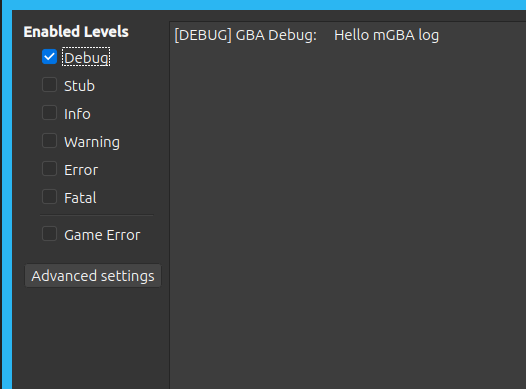
And there's your message.
When logging, you can choose to log at various levels: error, warning, info or debug. That's what the level business is for in mgbalog(). You write your desired log level to REG_LOG_SEND, this pulls double duty of telling mGBA at what level to store the message, and that you're done writing the message so mGBA can now process it.
Logging to your terminal
Opening the log window every time to view your logs can be tedious. If you launch mGBA from the command line, you can also tell it to write the logs to your terminal. To do this, go into the log window again and click, on advance settings, then check "Log to console" at the bottom.
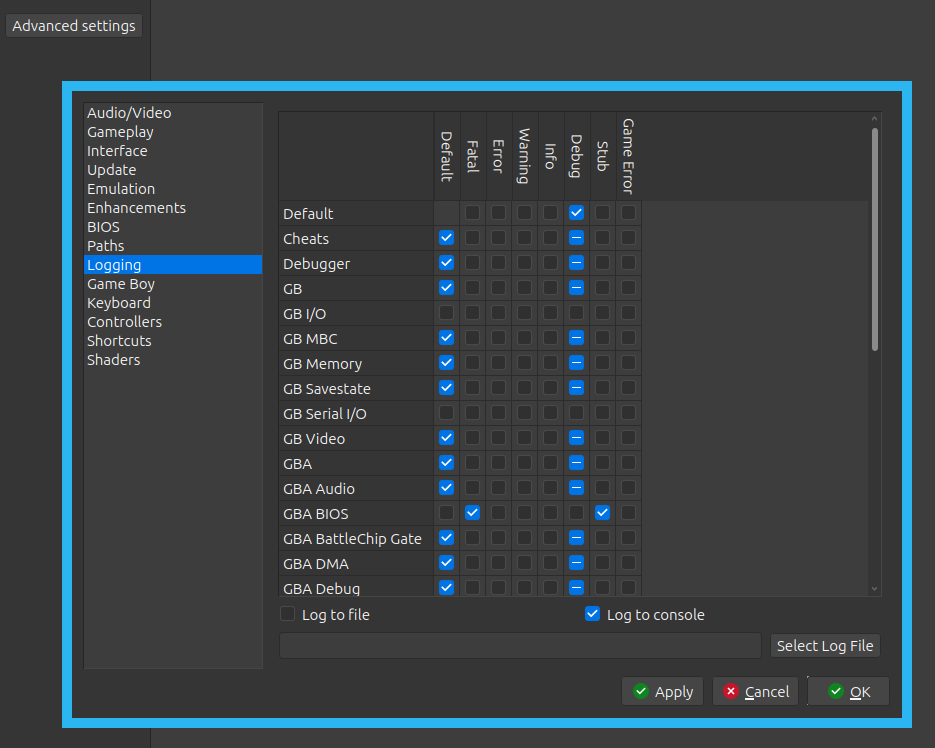
Now if you launch your game via the command line, the log output will show up there as well. You can control which level of log you want with --log-level. For example, here is how to only log DEBUG to the console.
mgba --log-level 16 yourRom.gba Here are the log levels
- 1 - fatal errors
- 2 - errors
- 4 - warnings
- 8 - info
- 16 - debug
- 32 - stub
- 64 - in-game errors
And you can combine them, so if you want debug and error, do --log-level 18
Adding formatting
Logging a static string is rarely useful. Thankfully it is easy to add printf style formatting.
#include stdarg.h > #include stdio.h >
static logBuffer [MGBA_LOG_MAX_LINE];
void level , *REG_LOG_ENABLE va_list formatArgs ; va_start(formatArgs, format ); vsnprintf(logBuffer, MGBA_LOG_MAX_LINE , format , formatArgs ); va_end(formatArgs); tonccpy((void logBuffer , MGBA_LOG_MAX_LINE ); *REG_LOG_SEND level ;}Now you can do things like mgbalog(DEBUG, "pos.x=%i", pos.x);.
Only logging during development
Logging adds to your binary, uses memory and cpu, and is generally not wanted in the final version of your game. This is especially true if you add formatting, things like vsnprintf from the standard library are pretty expensive on the poor lil GBA.
I hide my logging implementation behind an MGBALOG define. So when I want logging, I define MGBALOG. If it's not defined, nothing related to logging will get added to the binary.
#ifdef level , ...}#endifThat is all well and good, but this means if you don't define MGBALOG, then you have to remove all logging calls throughout your codebase, otherwise you will get a compilation error.
This is easily fixed with more define schenanigans. This is my mgbalog.h
#pragma tonc.h >
#define (vu32*)(0x4FFF780)#define level , format , Then throughout my game I call mgbalog(...) as before whenever I want to log something. This is now a macro that either calls _mgbalog() if MGBALOG is defined, or does nothing at all when it is not defined. Now you don't need to worry about your log calls, the game will always compile regardless.
With the above header file, here is my implementation.
#ifdef stdarg.h > #include stdio.h >
static logBuffer [MGBA_LOG_MAX_LINE];
void level , *REG_LOG_ENABLE va_list formatArgs ; va_start(formatArgs, format ); vsnprintf(logBuffer, MGBA_LOG_MAX_LINE , format , formatArgs ); va_end(formatArgs); tonccpy((void logBuffer , MGBA_LOG_MAX_LINE ); *REG_LOG_SEND level ;}
#endifConclusion
That's all there is to it. A simple little bit of code adds a lot of utility to your dev experience. There are mgba logging libraries out there if you don't want to roll your own. Or if you are using an engine like Butano, it already has mgba logging built in. Now when using a logging library, you know what it is doing behind the scenes, which is always a good thing.