How to get the link cable going for multiplayer on the Game Boy Advance
Now that I have added link cable multiplayer play in my Game Boy Advance game, I figured I'd write up a quick post on how I did it and some tips I can share, before I forget.
afska/gba-link-connection
afska's gba-link-connection library is really awesome and is the foundation for all of this. It is a C++ library that supports working with the link cable in many different ways:
- Standard link cable multiplayer play.
- Connecting to an e-Reader and loading scanned cards into your game.
- Connecting to the GameCube.
- Multiplayer play through the wireless adapter.
- And many more.
Seriously, this library rocks. For this article, we are only going to look at the first, and most basic one, using the link cable to connect two GBA's together and have them talk to each other to facilitate two player gameplay.
Copy the lib directory into your project
To use the library, the easiest way is to copy the contents of the lib/ directory into your project, assuming your game is written in C++. I am writing my game in C, so I also copied the c_bindings/ directory in. Within the lib directory, you'll roughly find one file per connection type. You only need to copy in the files corresponding to the type of link cable functionality you are interested in.
For my game, I copied these files into my project:
- C_LinkCable.cpp (from the c_bindings directory)
- C_LinkCable.h (c_bindings)
- LinkCable.hpp (lib)
- LinkRawCable.hpp (lib)
- _link_common.hpp (lib)
I copied them all into a single directory and massaged the #include statements to work.
If you have a typical devkitpro/tonc Makefile setup, then you can mix and match C and C++ files in your project and the build will do the right thing.
Setup some interrupts
The library uses the serial and a timer interrupt to do its work. If you're like me and using tonc, it's pretty easy to add these interrupt handlers. But this is a trap! If you read the comment at the top of LinkCable.hpp it says
// libtonc's interrupt handler sometimes ignores // interrupts due to a bug. That causes packet loss. // You REALLY want to use libugba's instead. // (see examples) This turned out to be key advice. For my game, every once in a while, a move one player did would not get sent to the other player. I debugged this for a while and poured over my code but I could not find anything wrong! It turns out, switching to libugba's interrupt system was the key to fixing this.
Hacking in libugba's interrupt system
I followed the library's examples lead on getting ugba set up. The library has libugba.a here, so you don't have to build the library. I made a clib/ directory in my project and copied it in.
Then in the Makefile, I had ld statically link that library in.
LDFLAGS -g $(ARCH) -Wl,-Map, $(notdir $*.map ),-L$(PWD)/clib
LIBS : = -lmm -ltonc -lgcc -lugba I added ,-L$(PWD)/clib to the ld flags, and -lugba to the libs variable.
Then I copied over interrupt.cpp and interrupt.hpp from the examples, this file is just a simple wrapper around ugba's interrupt functions. Despite being a C++ file, the code inside is also legal as C. So I changed the extensions to .c and .h, that way the file compiled into my project as a regular C file and I didn't have to bother with the name mangling that the C++ compiler does.
Setting up the interrupts
Now with ugba and the wrapper in place, setting up the interrupts was simple.
I already have a vblank interrupt for Maxmod (an audio library). To get the link cable's vblank interrupt added to that, I just did this little hack.
static void onVblank() { mmVBlank(); if (isLinkCableActive) { C_LINK_CABLE_ISR_VBLANK(); } }
int main() { ... interrupt_init(); interrupt_add(INTR_VBLANK, onVblank); ... Where isLinkCableActive is a simple flag I made for my game to indicate when I'm in two player mode.
Then to get the serial and timer interrupts established, I made this function.
void interrupt_add(INTR_SERIAL, C_LINK_CABLE_ISR_SERIAL ); interrupt_disable(INTR_SERIAL); interrupt_add(INTR_TIMER3, C_LINK_CABLE_ISR_TIMER ); interrupt_disable(INTR_TIMER3);}Then I can call interrupt_enable() and interrupt_disable() as needed as the player goes in and out of two player mode.
establish cLinkCable
The C bindings contain the line extern C_LinkCableHandle cLinkCable; (you can see it here). That is only an extern directive, telling the compiler the handle is actually defined elsewhere. It's up to you to define it somewhere within you game. So where it makes sense, define the handle:
#include cLinkCable ;Now you can initialize a linkcable connection and activate it.
cLinkCable = C_LINK_CABLE_BAUD_RATE_1 , C_LINK_CABLE_DEFAULT_TIMEOUT , C_LINK_CABLE_DEFAULT_INTERVAL , C_LINK_CABLE_DEFAULT_SEND_TIMER_ID );
C_LinkCable_activate(cLinkCable);Do some networking
Finally, we can actually send some data across the link cable.
if C_LinkCable_send(cLinkCable, }You can send unsigned half words (16 bit values), and the values must not be 0 or 0xffff, both are reserved by the library.
And here is how to receive the data.
C_LinkCable_sync(cLinkCable);u32 otherPlayerId = otherPlayerId )) u32 otherPlayerPacket = otherPlayerId );}The call to C_LinkCable_sync() is needed everytime you go to read data. And when you read data, it is important to read all of it. That is why there is a while loop on canRead. In case the other player sent several packets over, we'll grab and process all of them. By default the library's queue is big enough to hold 15 packets.
The line establishing otherPlayerId is a little trick to get the other player's ID. So if this is player 0, then otherPlayerId will be 1, and vice versa. This little trick of course only works in two player scenarios.
That's it! Now for some tips
This library is really easy to use, and GBA networking is nice and simple compared to modern machines. It's also so fast it's essentially synchronous, which is also great.
With the essentials out of the way, here are some more tips I can share.
mGBA supports the link cable
To test multiplayer in mGBA, fire up your game as you normally would. Then go to File > New multiplayer window. In the new window that pops up, load your game's ROM. You now have two GBA's connected by a link cable.
The way I did networking for my game, it doesn't matter which GBA is player 1 and which is player 2, but sometimes it does. The link cable itself has different connectors, the small purple connector plugs into player 1, and the wider, grey connector, plugs into player 2.
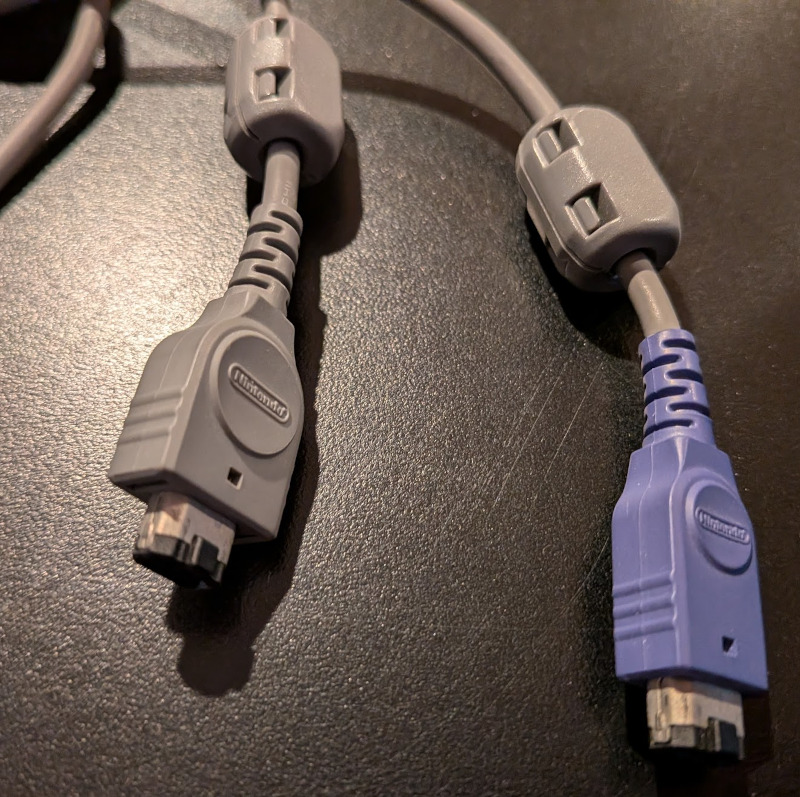
If this does matter for your game, then when you do File > New multiplayer window, the new window that pops up is player 1, and the original window is player 2. Why? I have no idea, it seems backwards to me. But through experimentation I am pretty sure this is correct.
Networking is very tricky
Actually getting your game to robustly work in two player mode via a link cable requires careful planning and thought. For my game I established a simple protocol that uses the top 4 bits of the 16 bit half word to indicate what type of message is being sent, and the bottom 12 bits are the payload of the message.
For example, here is how I send the player's cursor position across the cable.
...#define SERIAL_MESSAGE_CURSOR 6 ...
#define SERIAL_BUILD_MESSAGE(id, payload) (((id & 0xf) << 12) | payload)
#define BUILD_SERIAL_CURSOR(x, y) \ (SERIAL_BUILD_MESSAGE(SERIAL_MESSAGE_CURSOR, \ ((x & 0x3f) << 6) | (y & 0x3f)))
...
if (cursorSendPending && C_LinkCable_canSend(cLinkCable)) { C_LinkCable_send(cLinkCable, BUILD_SERIAL_CURSOR(cursorX, cursorY)); cursorSendPending = 0; } Establish a handshake
Before your game can start sending messages, it needs to be confident the other side is set up and ready to receive them. This is traditionally done with a "handshake", where the two sides of the network make sure they are both there and establish a proper connection.
For my game I created a symmetrical handshake. When the player enters two player mode, they are first greeted with this.
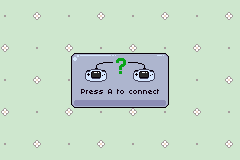
Once the player presses A, I start sending out handshake messages. And I also start listening for handshake messages coming from the other GBA. It's important to only listen for handshakes while you are also sending out handshakes, otherwise it's very easy for the handshake to go screwy.
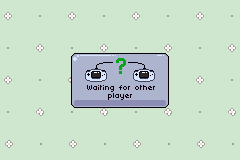
The handshake contains a random 8 bit number, and once the GBA receives a handshake message, it extracts that number and sends it back as a handshake echo message. After a GBA has sent handshakes and received back echos 5 times, it is satisfied the connection is established and moves on. 5 times is probably overkill, but eh, it takes a fraction of a second.
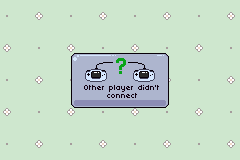
During the handshake, if the GBA does't hear anything within 15 seconds, it gives up with a timeout.
Synchronize before gameplay starts
It's important that both GBA's start the gameplay at the same time. To accomplish this, I have a "sync" phase just before gameplay starts. Here player 1's GBA (with ID of zero) sends a message. Once player 2's GBA gets that message, it sends one back. Player 2 then waits one frame, and then starts. Player 1 will start as soon as it receives player 2's message. Processing a message takes one frame, so that is why player 2 waits that one extra frame. With this, both sides start at the exact same time.
Audio can lock things up
The GBA only has a single CPU for everything, so the main CPU is handling gameplay, writing to VRAM, handling the audio and handling the link cable. For my game, I found if I had music playing in two player mode, the CPU would get overloaded and the game would lock up.
To fix this, I changed the interval from C_LINK_CABLE_DEFAULT_INTERVAL to C_LINK_CABLE_DEFAULT_INTERVAL * 3 when I called C_LinkCable_Create() (see above). The interval is how long the link cable library will wait between processing messages. The longer it waits, the less CPU it uses. Since my game is a slow puzzle game, this works just fine and it frees up enough CPU to let the music play. If you are making a fast action game, you might not be so lucky.
Multiboot mode
This article is covering standard link cable play. That means in order to have a two player session, the players need two GBA's, a link cable, and two copies of my game. The GBA also has what is called multiboot mode. Here the players only need one game cart, as the cartridge will send a small program across the link cable to the other GBA.
This is much more complicated and something I've not tackled just yet. But it is possible. The link cable library has full support for this and several samples showing how to do it.
Thanks afska!
And I just want to close this one out with a big thank you to afska for creating this great library. I've had zero issues with it, it just works. Great stuff!